🎹 Sheet to Piano
Upload a photo of piano sheet music and get a video of it being played.
Enter your token
You need a token to make videos. Ask the person who shared this site with you.
Don't have a token?
Your sheet music
Tips for best results
- Printed music works best. Handwritten music usually can't be read.
- Take the photo straight from above, in good light, with the whole page visible.
- Put the pages in playing order. Use the arrows to reorder them.
- After the video is made, check the notes below it. The reader can make mistakes.
Making your video…
This can take a few minutes per page. You can keep this page open, or bookmark it and come back later.
Your piano video
Check and fix the notes
Compare this with your sheet. Click any bar to fix a wrong, missing or extra note, then remake the video.
How to fix a bar
- Find the bar. Bars outlined in red don’t add up and are the likeliest to be wrong; the buttons above list them. You can also click any other bar.
- Pick a note. Each hand’s notes are listed in order, as in the small picture of the bar. Click one; it turns purple in the picture.
- Wrong note? Click the right key on the little piano (◀ ▶ show lower or higher keys).
- Wrong length? Choose whole, half, quarter, 8th, 16th or 32nd, and dotted or triplet if the sheet shows it.
- Missing note? Click the + where it belongs, or click the rest that stands in its place and pick its key. Use + Note on top for a chord.
- Extra note? Select it and click Delete, or Make it a rest.
- Check it. “Notes add up to 4 of 4 beats ✓” means the bar is complete. Press ▶ Listen to hear it.
- Next. Click Continue to next problem bar, and when you’re done, Save fixes & remake video once for all of them.
Changed your mind? Undo my changes to this bar, Discard before saving, or Go back to the notes as first read after saving.
Click a note above to change it.
Your original pages
See an example
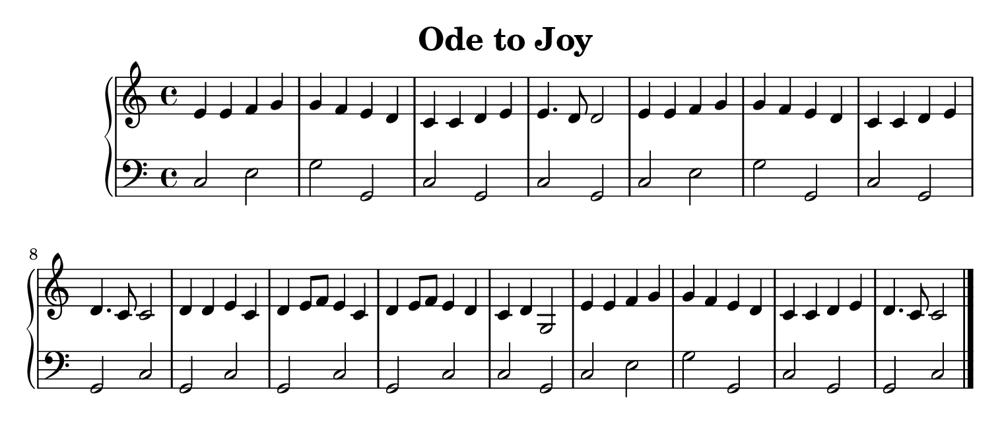
This is a one-page arrangement of Beethoven's Ode to Joy. We read the notes from the sheet below and made the video under it. Blue notes are the right hand, orange notes the left hand.
How it works
- Upload your pagesTake a clear photo of each page, or upload a PDF. Several pages are fine.
- We read the notesOur music reader finds each grand staff and reads the notes, rhythms, clefs and key. The top staff is played by the right hand, the bottom staff by the left.
- Watch and practiseNotes fall onto a piano keyboard in time with the music. Slow it down, or make a video with just one hand.
Questions
What kind of sheet music works?
Printed piano music with a treble and bass staff (a grand staff) works best. Music where both staves use the treble clef works too. Handwritten music usually can't be read.
Can I practise the right hand or left hand alone?
Yes. After your video is made, switch to “Right hand” or “Left hand”. The other hand is shown as faint outlines so you can see where it plays, but you only hear the hand you chose.
Can I change the speed?
Yes, from 40 to 200 beats per minute. Choose a slow speed for learning and remake the video faster as you improve.
What do I get?
An MP4 video with falling notes, a MIDI file you can open in piano apps such as Synthesia or GarageBand, and MusicXML you can open in notation software such as MuseScore.
Which files can I upload?
JPG, PNG, iPhone photos (HEIC), PDF, or MusicXML, up to 4 pages and 30 MB at a time.
Are the notes always right?
Not always. Reading music from a photo is hard, especially with shadows, tilted pages or very busy music. Open “Check the notes we read” under your video to compare with your sheet.
Why do I need a token?
The site runs on one small free server, and each video takes a few minutes to make. Tokens keep it fair for everyone. You can ask for one above, with no email needed.
What happens to my uploads?
Your pages and videos are kept only so you can download them, then deleted automatically after 3 days. They aren't shown to anyone else. See the privacy page.